CozyCot Ads

Showing posts with label Chrome. Show all posts

Sunday, April 10, 2011

Images not loading - many sites - Chrome 2.0.172.30 - Google Chrome Help

Images not loading - many sites - Chrome 2.0.172.30 - Google Chrome Help

This website really helped me soft my problem with errors seeing pictures.


I just typed "why i cannot see image in chrome" in google search and came to this website. and yes I can see the pictures immediately after re-installing Java. No restart needed for my Win 7!

So if you have the same problem as me, please just go re-install your java. Now I am using Version 6.
You can download Java from this link here. http://java.com/en/download/chrome.jsp?locale=en&host=java.com

or just do your searches here http://www.oracle.com/technetwork/indexes/downloads/index.html

You may want to surf around my blog.If you like, please visit my Support page.
*Lynspirations
Share and learn. Learn and share :)

Saturday, February 12, 2011

Clouds Theme (Aero) - Chrome Web Store

Just changed my theme for my Chrome and this is so awesome. You should use it too!

Click on the picture to see an enlarged view (so that you can see it more CLEARLY ;p)


I am using this Clouds Theme (AERO) from the Chrome Web Store.

Well you can see the arrow that I pointed down. it is actually the status bar.
This is important to me and for the so-many-themes I have tried, it was really difficult to see the status or the link which my cursor hovers over.

Plus being an ESFP, I really want something that is dynamic!

I normally want a preview of where the link will lead me to, before I open them. I still do this despite my anti-virus protection (read my post on virus protection here). I am using Vipre.

You may want to view my other Computer posts or surf around my blog. If you like, please visit my Support page.
*Lynspirations
Share and learn. Learn and share :)

Entanglement by Gopherwood Studios

This is fun!

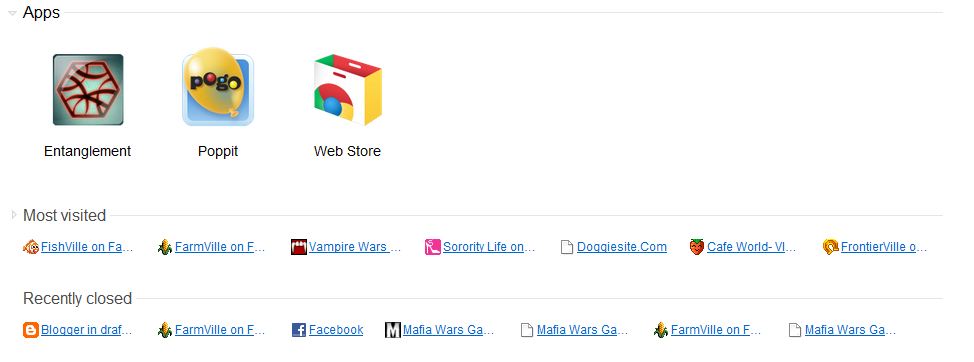
When I open Chrome today ( to go to Facebook), I saw these 3 new games on my tab.

Click on the pictures to see them in normal sizes


Then I clicked on Entanglement and it seems like a game. There are no instructions and I just clicked anyhow.

After a few tries, I got 22 and I decided to submit it. I am this Cheerful Bewildered Flower ;p
See the top scores! WoW!


Did a search on entanglement and found these:


I am going to try the few other games next.

You may want to surf around my blog. If you like, please visit my Support page.
*Lynspirations
Share and learn. Learn and share :)
Friday, October 8, 2010

John Lennon

Today Google celebrates John Lennon's day.


Great for his fans. Well, I am and will not be one. Nor do I like his wife.

Are you one? www.google.com  


displayed this video which I managed to find the link...

It appears like this (if you click on the picture and plays the video, it actually plays as a small video clip)... 
GoogleJohnLennon.png
 (click on the pictures to see a larger view)

And when it is done, it actually goes to a Google search on John Lennon.
Looks good, the search but why him?

GoogleJohnLennon2.png

And when I go to find his wife, there is his face on the Google logo..
Is this corny or what (yeah, i made it happened ;p)


And just to show that I am me, (yes, me-myself-and-i), I went to use Google Chrome's Function (read my post on how to see the status function in Google Chrome here or the Google Chrome Tab Tricks here...) to view the source code...


And I saw this:


And figured out that Google must be using their YouTube to play the movie, so I did a find for "youtube" and saw the address... and pasted the link into a new window and yeah!


Well, the cool thing is not the idea of checking the source code, nor to use the "find" function to look for "YouTube", but that the site itself does not show any thing but a video!

Just you place this link:

www.youtube.com/v/kTPbOJ4gwTE 

or just click on it in a Chrome Browser, you will see this:


(Yeah it's the 10minute video I posted a few days back for my dog walk, which some told me they wasted 1 and 10 minutes, the duration they spent watching the clip, of their life!)

and if you copy that link (or both links) to other browsers... you will see these:


BORING!

(yeah I love Google and not other browsers!)

yeah, enough said, this thing about John Lennon bores me out too... But a few links for you to search, if you just happen to be his fan...


Hi You may want to view my other Life posts or surf around my blog. If you like, please visit my Support page.
*Lynspirations
Share and learn. Learn and share :)

Saturday, August 28, 2010

Google Phone Call

Wow this is impressive!

Google lets you make free phone call...


Took a printscreen from my Darling No 1's Google account... and edited the screenshot.

As you can see, he made the call and I took the screen shot at 2.54 minutes. (He was using FireFox)

The call connected almost instantly and what is most amazing, is that you only need to download a simple application. No long waiting time and it is really hassle free! And it works for Chrome too!

Another one up!


You may want to surf around my blog. If you like, please visit my Support page.
*Lynspirations
Share and learn. Learn and share :)

Wednesday, May 5, 2010

Chrome Extension - Turn Off The Lights

My Darling No 1 followed me and is now a Chrome Convert!

He said that this Turn Off the Lights Theme is nice and I want to share with you all too...


More readings here at Stefan vd Blog


You may want to surf around my blog. If you like, please visit my Support page.
*Lynspirations 
Share and learn. Learn and share :)

Wednesday, April 28, 2010

Google Chrome - Tab Tricks

How cool is this!

Just learnt a new trick...

Tip 1 - Close Tab with the Mouse Scroll Button
You can close tab with the mouse scroll button! (Chrome only) This is so convenient! You don't have to go and point to the small cross of the tab. In fact, now this encourages me to go and make all the tabs extremely small!

Now, normally the tabs in Chrome are the big size chunks of around 2 inches (at least they appear that on my 17"inch Acer monitor).


Tip 2 - Change Size of the Tabs
The size of the tabs can be changed so that you know how many sites you are surfing on Chrome.

Big Tabs (normal)


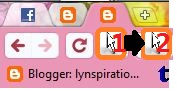
Small Tabs (minimized) - Only the first 2 tabs are minimized. the 3rd one is left as the normal size for your comparison.


You can make them appear small by clicking on the center of the tab and then move your mouse to the left side (still holding that click). The Cursor 1 shows your cursor at the Start position and Cursor 2 shows the ending position.


Similarly if you want to make the tab appear in their normal size, just click on the tab and then drag your cursor to the right. Again, The Cursor 1 shows your cursor at the Start position and Cursor 2 shows the ending position.


Sometimes you may need to move it abit out, to the extreme right, but it is okay. The tab jumps back once you release your click.


Tip 3 - Hover for information
You can leave your cursor on the minimized or even the normal sized tabs to see more information on the site without opening that tab.

In this picture, I am at "Blogger in draft: Lynspira...". I hovered my cursor on the first tab, with the FaceBook Logo. and the cursor shows the page that I am logged in at Facebook - Confirm Requests.


Now aren't these tips neat! Now you can go and surf better :)

Read more at Google Chrome Blog - Close Tab with your mouse scroll button

You may want to surf around my blog. If you like, please visit my Support page.
*Lynspirations 
Share and learn. Learn and share :)

Saturday, March 6, 2010

Google Chrome - Status


For the nerds like me, you will want to know this: you can see the memory usage for Chrome (and other Internet Browsers) without calling up the Task Manager (avoiding the tedious Control-Alternate-Delete stuff)...

Just click on the blank space on the tabs (see the yellow star?) and click on the Task Manager...


Then you can click on the Stats for nerds... 


And you will be able to see your stats like this:


Isn't it convenient?


You may want to surf around my blog or read more at Google Chrome Blog - Close Tab with your mouse scroll button. If you like, please visit my Support page.


*Lynspirations
Tips for your internet browsing...

Tuesday, February 23, 2010

Google Chrome - Browser test (Update)


I posted previously that I did a browser test that showed my favorite Firefox to be so laggy.

Well I did another test again. I just wasn't convinced that my favorite is so snail-like!

I went to fiddle with my Firefox and there it was... the cause of it all ... Norton!


I disabled it and am convinced that it must be Norton that made my Firefox so undesirable!

Then I did another test and guess what?


The result wasn't overly impressive!

Guess what I did next? I went to disable the rest of my add-ons for Extensions and Plugins.


And the result was this.


Not to leave any stone unturned, I went to enable even my add-ons for Plugins. And I got this:


Seems like the results did not change too much.

So disappointed with the results. 

Then I went to fiddle with my Themes.


I changed back to the default 3.6 Theme.

Hey, I got abit of improvement there...


But of course it is NOT much.

Guess I just have to admit it. There is no way to hit what Google Chrome has achieved.

But you know this. It is lonely up there.


To read more about Mozilla Firefox Add-ons, you can go to:


Or


*Lynspirations
Firefox, Firefox, I thought you could fly!

Google Chrome - Browser test


This is interesting!

I did a test on 3 of my Internet Browsers.

Guess the results from WhatBrowser.Org says?

I was clicking away on my new browser Chrome and I landed on this page:


Then I did this test and got these results below. I was not impressed when I saw the results for my Chrome 4.0.249.89 (38071). But I was shocked when I saw the results for Firefox 3.6 and decided to test my IE 8.


Guess this is a surprise for me! But of course, I don't have any add-ons for Chrome and I don't do any updates for IE8 too. Firefox has just too many add-ons. Of course I prefer Firefox. But I do need 2 browers because I use mutliple emails where logging in and out of accounts are tedious for me!

*Lynspirations
You never know if you never try

Sunday, February 21, 2010

Google Chrome


Yesterday I downloaded Google Chrome.

Best browsers... with a great theme :)

Of course I like the flowers and the pinkness of it all...


And the history thing. It just reminds me of how much I am spending on the Internet.


Want to know more?


*Lynspirations
Great idea - Chrome is here to stay.


Dreamstime

CozyCot Adv

Subscribe Now: standard